You ran a query. It came back with 4,000 rows. Somewhere in those rows is the value you care about. You press Cmd+F, type the string, and the browser's find highlights nothing because only about 30 rows are in the DOM. The rest are virtualised away.
So you do what everyone does. You go back to the editor, add
WHERE email ILIKE '%alice%', re-run the query, wait for the result, realise
you also need the rows around Alice for context, remove the WHERE, re-run,
and start scrolling. Or you export to CSV, open it in a spreadsheet, and use
the spreadsheet's find. Either way you have left the place where you were
working.
I have done both of these enough times that when I finally built a find bar for the results grid in data-peek (v0.39.1), the main thing I felt was annoyance at not having done it sooner.
#Why the browser's find cannot help
A virtualised table renders only the rows visible in the viewport. If you have
4,000 rows and the viewport shows 30, there are 30 <tr> elements in the DOM.
The browser's Ctrl+F searches the DOM. It will never find a value on row 2,400.
If you have read about how data-peek virtualises its grid, the trade is familiar: virtualisation keeps render time flat regardless of result size, but it means every feature that needs to see all the data has to maintain its own index outside the DOM.
Pagination adds a second layer. The grid pages the filtered, sorted result into pages of 25 to 500 rows. Even without virtualisation, the browser's find only sees the current page.
So find has to work against the full, pre-pagination result, in memory, without touching the DOM at all.
#Building the index once
When the find bar opens, the first thing that happens is a call to
buildFindIndex. It walks every row of the filtered and sorted result,
converts each cell to its text form, and stores the whole lot in a flat array.
// apps/desktop/src/renderer/src/components/cell-grid/grid-find.ts
export function buildFindIndex(
  rows: ReadonlyArray<Record<string, unknown>>,
  columns: ReadonlyArray<{ name: string }>,
  isMasked: (columnName: string) => boolean
): FindIndex {
  const names = columns.map((column) => (isMasked(column.name) ? null : column.name))
  const texts: (string | null)[] = new Array(rows.length * names.length)
  let i = 0
  for (const record of rows) {
    for (const name of names) texts[i++] = name === null ? null : cellText(record[name])
  }
  let lowered: (string | null)[] | null = null
  return {
    colCount: names.length,
    texts,
    lowered: () => (lowered ??= texts.map((text) => (text === null ? null : text.toLowerCase())))
  }
}
A few things about this.
The flat texts array is row-major: element i maps to row
Math.floor(i / colCount), column i % colCount. That layout means matching
is a single linear scan. No nested loops, no per-row allocations.
The lowered() getter is lazy. If the first search is case-sensitive, the
lowercase copy is never built. If it is case-insensitive (the default), the
copy is built once and cached.
Each cell is converted by cellText, the same function copy uses. If a cell
holds a JSON object, cellText returns JSON.stringify(value). If it is
null or undefined, it returns null, which means null cells never match
anything. That is intentional: "null" is not a value, and matching it would
be more confusing than useful.
// apps/desktop/src/renderer/src/lib/selection-serialize.ts
export function cellText(value: unknown): string | null {
  if (value === null || value === undefined) return null
  return typeof value === 'object' ? JSON.stringify(value) : String(value)
}
On the benchmark data set (100,000 rows, 10 columns), building the index takes about 40 ms on my machine. That cost is paid once per result. Every keystroke after that only pays for matching.
#Matching per keystroke
Once the index exists, findMatches runs a linear scan over the texts
array and collects every hit.
// apps/desktop/src/renderer/src/components/cell-grid/grid-find.ts
export function findMatches(index: FindIndex, query: FindQuery): FindResult {
  if (query.needle === '' || index.colCount === 0) return NO_MATCHES

  let texts = index.texts
  let test: (text: string) => boolean
  if (query.regex) {
    let pattern: RegExp
    try {
      pattern = new RegExp(query.needle, query.caseSensitive ? '' : 'i')
    } catch (err) {
      return { kind: 'invalid-regex', message: err instanceof Error ? err.message : String(err) }
    }
    test = (text) => pattern.test(text)
  } else if (query.caseSensitive) {
    const needle = query.needle
    test = (text) => text.includes(needle)
  } else {
    const needle = query.needle.toLowerCase()
    texts = index.lowered()
    test = (text) => text.includes(needle)
  }

  const matches: GridMatch[] = []
  for (let i = 0; i < texts.length; i++) {
    const text = texts[i]
    if (text !== null && test(text)) {
      matches.push({ row: Math.floor(i / index.colCount), col: i % index.colCount })
    }
  }
  return { kind: 'ok', matches }
}
The case-insensitive substring path is the common one. It pre-lowercases the
needle, switches to the pre-lowered texts array, and calls .includes(). On
the same 100k-row bench, a case-insensitive search for a rare needle takes
about 8 ms. A needle that matches nearly every cell takes about 19 ms.
Both numbers are from grid-find.bench.ts on my machine; yours will vary.
There is a small detail with the regex path: the RegExp is created without
the g flag. A global regex carries lastIndex between .test() calls, so
reusing one across a million cells would silently skip matches. Dropping g
makes the pattern stateless.
If the needle is not a valid regular expression, findMatches catches the
error and returns { kind: 'invalid-regex' }. The find bar shows "Invalid
regex" in place of the match count instead of throwing.
#Deferring the query
Even 19 ms on every keystroke is more than a 60 Hz frame, so typing fast into
a large result would make the input lag. The hook wraps the query state in React.useDeferredValue:
// apps/desktop/src/renderer/src/components/cell-grid/use-grid-find.ts
const deferredQuery = React.useDeferredValue(query)

const index = React.useMemo(
  () =>
    open
      ? buildFindIndex(
          rows.map((row) => row.original),
          columns,
          (name) => maskedColumns.has(name)
        )
      : null,
  [open, rows, columns, maskedColumns]
)

const result = React.useMemo(
  () => (index ? findMatches(index, deferredQuery) : NO_MATCHES),
  [index, deferredQuery]
)
The input updates immediately. The match computation runs with the deferred value, so React can batch it into a lower-priority render. The previous highlights stay on screen while the new matches are computed. On a fast machine the delay is invisible. On a slow one, it keeps the input responsive at the cost of highlights lagging by a frame or two.
#Mapping a match to a page and cell
Each match in the array is a { row, col } pair where row indexes the full
filtered and sorted result, not the current page. To step to a match,
locateMatch divides by the page size:
// apps/desktop/src/renderer/src/components/cell-grid/grid-find.ts
export function locateMatch(
  match: GridMatch,
  pageSize: number
): { pageIndex: number; pos: CellPosition } {
  return {
    pageIndex: Math.floor(match.row / pageSize),
    pos: { row: match.row % pageSize, col: match.col }
  }
}
If the target page is not the current page, the hook calls setPageIndex to
switch pages, then stores a pendingFocus. An effect watches for the page
render to complete (the target row must exist in the DOM), then calls
focusCell to scroll the matched cell into view and focus it.
// apps/desktop/src/renderer/src/components/cell-grid/use-grid-find.ts
React.useEffect(() => {
  if (!pendingFocus) return
  if (pendingFocus.pageIndex !== pageIndex || pendingFocus.pos.row >= pageRowCount) return
  focusCell(pendingFocus.pos)
  setPendingFocus(null)
}, [pendingFocus, pageIndex, pageRowCount, focusCell])
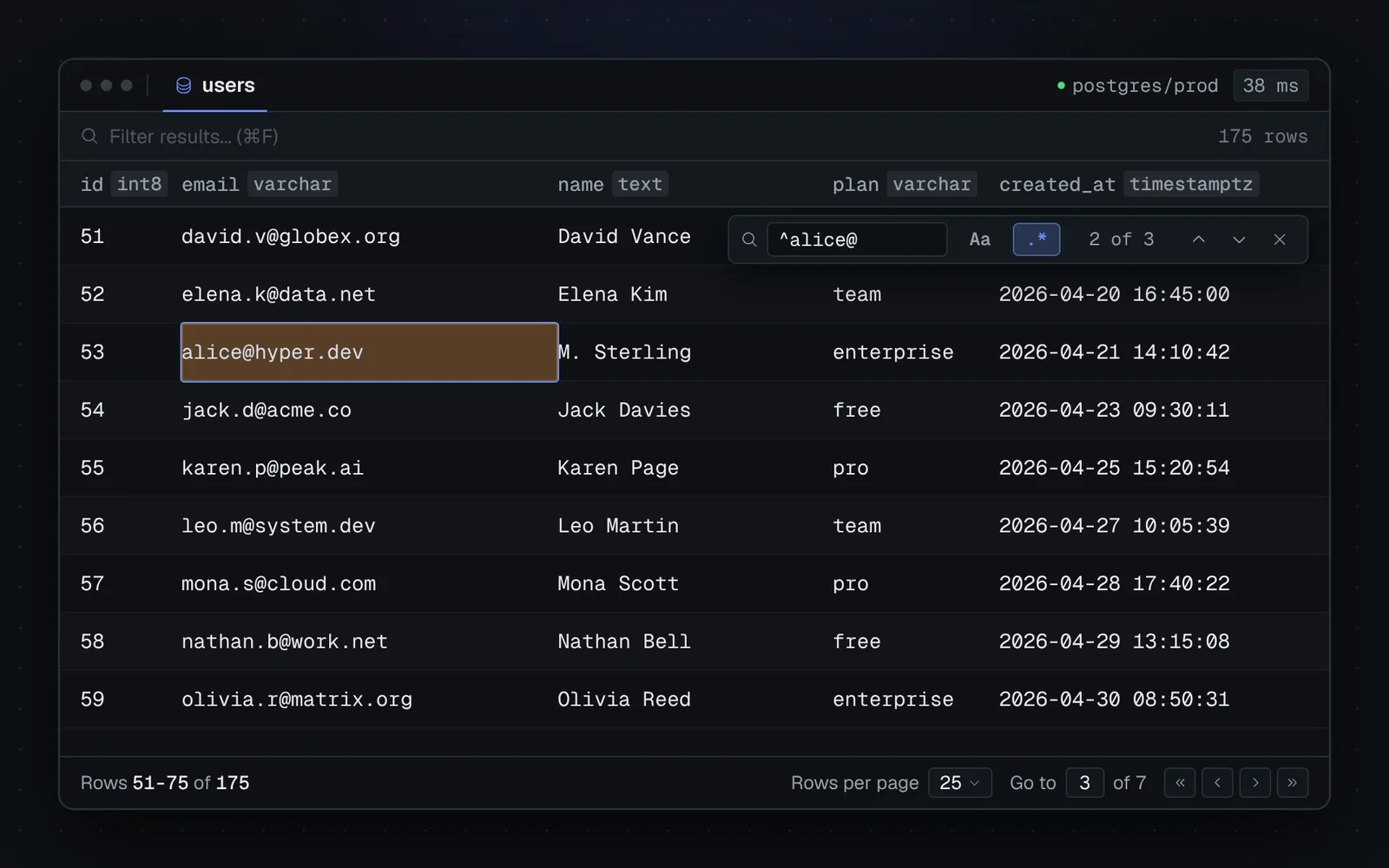
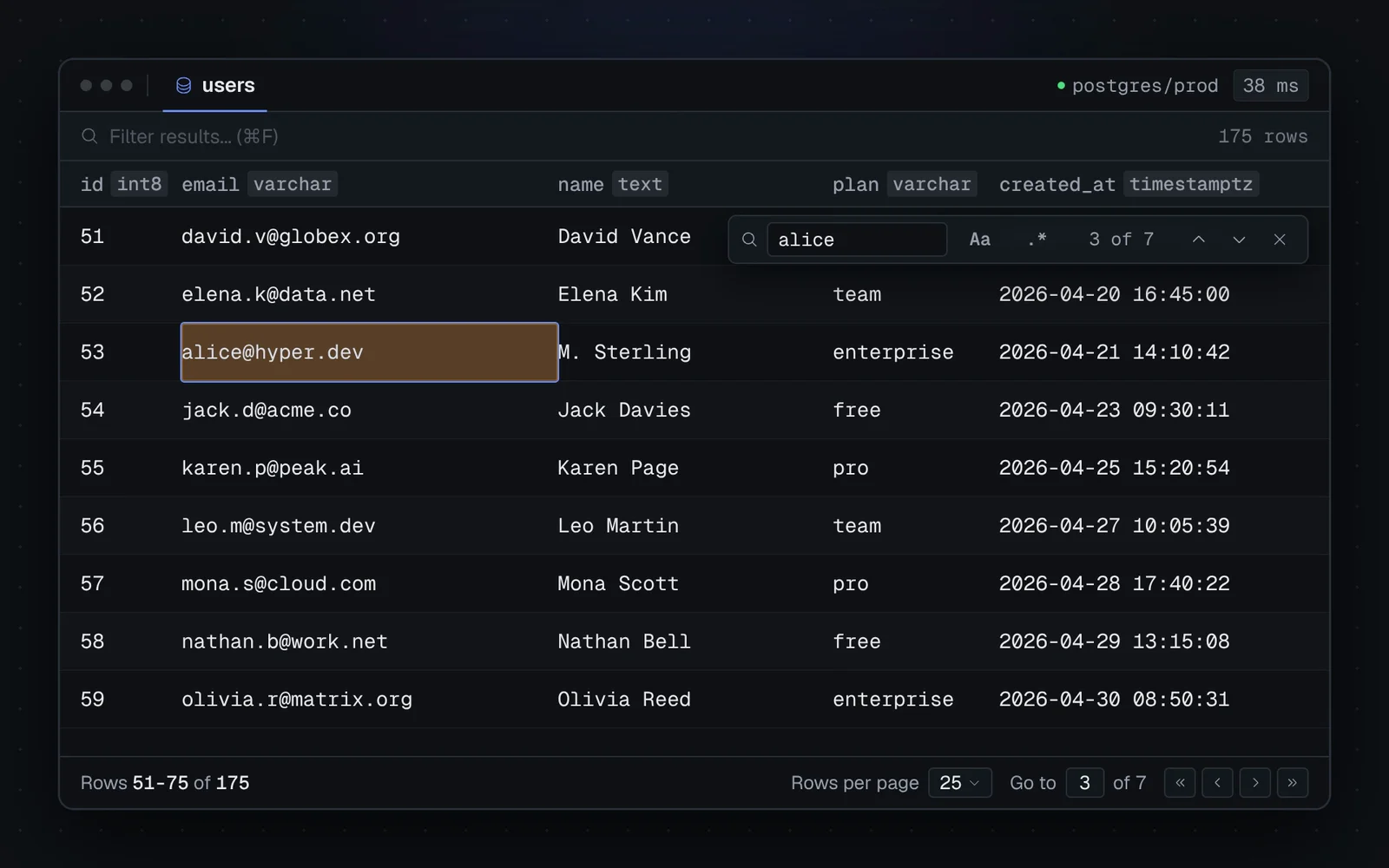
Enter steps forward, Shift+Enter steps backward. Cmd+G and Shift+Cmd+G do the same from anywhere in the grid, not just while the find input is focused. The counter in the find bar shows "3 of 12" when you are stepping, or "12 matches" before the first step.
#The highlight overlay
Matches on the current page are painted by an absolutely positioned overlay that reads the grid's column widths and row height from a shared geometry object. The current match gets a different fill colour so you can see which one you are on.
// apps/desktop/src/renderer/src/components/cell-grid/find-match-overlay.tsx
<div
  key={`${match.row}:${match.col}`}
  aria-hidden
  data-cell-find-match={isCurrent ? 'current' : ''}
  style={{
    // ...
    background: isCurrent ? 'var(--cell-match-current-fill)' : 'var(--cell-match-fill)',
    boxShadow: isCurrent ? 'inset 0 0 0 1px var(--cell-match-current-border)' : undefined
  }}
/>
The overlay only renders matches inside the current rowWindow (the rows
the virtualiser has mounted). Matches on the same page but outside the
viewport are skipped, so scrolling a page with hundreds of matches does not
paint hundreds of invisible divs.
#Masked columns never match
If you have
masked columns for PII, the index
stores null for every cell in a masked column. The masking check happens at
index-build time, not at match time, so it costs nothing per keystroke.
// apps/desktop/src/renderer/src/components/cell-grid/grid-find.ts
const names = columns.map((column) => (isMasked(column.name) ? null : column.name))
// ...
for (const name of names) texts[i++] = name === null ? null : cellText(record[name])
This is the right behaviour. If someone has masked a column, the purpose is to prevent the value from being visible. Letting find match against it would leak the value by confirming its presence.
#The Cmd+F handoff
Cmd+F does three different things depending on where focus is. If you are in
the SQL editor, it opens the editor's own search. If you are inside the
results grid (any element under a [data-cell-grid] wrapper), it opens the
grid's find bar. Everywhere else, it focuses the Smart Filter bar.
The Smart Filter bar's global listener is the one that decides:
// apps/desktop/src/renderer/src/components/smart-filter-bar.tsx
const isInEditor =
  target.closest('.monaco-editor') || target.closest('[data-monaco-editor]')
const isInGrid = target.closest('[data-cell-grid]')
if (!isInEditor && !isInGrid) {
  e.preventDefault()
  inputRef.current?.focus()
  // ...
}
The grid's find bar registers its own Mod+F hotkey scoped to the grid
element, so it fires first when focus is inside the grid. The filter bar's
global listener sees isInGrid is truthy and does nothing.
#When you should just write a WHERE clause
Find is for the case where you already have results and want to locate something in them. It searches the rows the database already returned. It does not re-query.
If your table has a million rows and you ran SELECT * FROM users LIMIT 5000,
find searches those 5,000 rows. It will not find a value in row 5,001.
If you know what you are looking for before you run the query, write
WHERE email ILIKE '%alice%' and let the database do the work. It searches
every row in the table, not just the ones you fetched, and on Postgres a
trigram index (pg_trgm) can serve that leading-wildcard pattern, which a
plain B-tree cannot. The find bar only ever does a linear scan over what is
already in memory.
Find is useful when you do not know what you are looking for yet, when you
want to explore a result you already have, or when adding a WHERE clause
means re-running a slow query and losing the result you are staring at.
#The find bar controls
For reference, the full set of shortcuts and toggles:
| Action | macOS | Windows/Linux |
|---|---|---|
| Open find (from grid) | Cmd+F | Ctrl+F |
| Next match | Enter or Cmd+G | Enter or Ctrl+G |
| Previous match | Shift+Enter or Cmd+Shift+G | Shift+Enter or Ctrl+Shift+G |
| Toggle Match Case | Option+C | Alt+C |
| Toggle Regular Expression | Option+R | Alt+R |
| Close find | Escape | Escape |
The two toggle buttons in the bar are labelled Aa (Match Case) and .* (Use Regular Expression). Both are off by default.
#What I'd do differently
The index should be incremental. Right now, if the result changes (a Watch Mode tick, a re-sort) while the find bar is open, the entire index is rebuilt. For 100k rows that is about 40 ms, which is fine, but a Watch Mode query rebuilds it on every tick even when nothing changed. A hash of the rows would let me skip the rebuild when the data is the same.
Match highlighting should show partial matches inside a cell. Currently, the whole cell is highlighted. VS Code highlights the matched substring within the line. That is nicer when several cells contain the needle as a substring of a longer value. I did not do it because the overlay paints one rectangle per cell using the grid's geometry; painting a substring highlight would require measuring text within the cell, which is a different problem.
Maybe the first match should be selected as you type. The find bar shows the total match count as soon as you type, but it shows "12 matches" rather than "0 of 12" until you press Enter. VS Code shows "1 of 12" immediately, auto-selecting the nearest match. I skipped auto-selection because on a paginated grid it would flip the page while you are still typing the needle, which felt more disruptive than helpful. I am not sure that trade-off is right.
#If you want to try it
The find bar shipped in v0.39.1. The implementation is in grid-find.ts, use-grid-find.ts, and cell-find-bar.tsx if you want to read the full source. The keyboard navigation that makes stepping between matches feel right is covered in a separate post.
data-peek is at datapeek.dev. Free for personal use, MIT source. If you have ever exported a result to CSV just to Ctrl+F through it, this is why the feature exists.