The usual way to put an AI on your database is to paste an API key into yet another tool and start a second bill. Meanwhile the coding agent you already pay for is installed and signed in on the same laptop, doing nothing while you write SQL.
Billing is the small problem. The bigger one is trusting what the model writes. The obvious guard, "only run it if it starts with SELECT", is not a guarantee. A model writes SELECT record_audit_event(). A keyword check sees a read. The database sees a function that inserts rows. A keyword check inspects syntax; the engine executes semantics, and that gap is where production damage happens.
When I built Ask in data-peek (v0.37 to v0.39), I wanted both fixed: use the agent CLI you already pay for without pasting a key, and have the database engine itself refuse writes from AI-written reads.
#Driving the CLI you already have
If you use Claude Code, Codex, or Antigravity, the CLI is already installed and logged in. When no AI is configured, data-peek probes for claude, codex, and agy.
GUI-launched macOS apps do not inherit login-shell PATHs. If Claude Code was installed via Bun or Homebrew, a standard spawn check fails with ENOENT. The runner augments PATH with common directories (/opt/homebrew/bin, ~/.local/bin, ~/.claude/local, etc.) before testing binaries:
// apps/desktop/src/main/harness/runner.ts
const child = spawn(bin, ['--version'], {
  env: { ...process.env, PATH: augmentedPath() },
  shell: false,
  stdio: ['ignore', 'pipe', 'pipe']
})
child.on('close', (code) => {
  resolve(code === 0 ? { available: true, version: stdout.trim() } : { available: false })
})
One detected CLI shows a single button: Use Claude (or Codex, or Antigravity) with your subscription. Multiple CLIs collapse into a Choose AI menu under Use your subscription, with Other providers… for API keys.
To ensure the CLI uses your existing login rather than a stray shell token, the adapter drops API keys before spawning:
// apps/desktop/src/main/harness/adapters/claude-code.ts
function claudeEnv(): NodeJS.ProcessEnv {
  const env: Record<string, string | undefined> = { ...process.env, PATH: augmentedPath() }
  delete env.ANTHROPIC_API_KEY
  delete env.ANTHROPIC_AUTH_TOKEN
  return env as NodeJS.ProcessEnv
}
Codex and Antigravity adapters do the same for OPENAI_API_KEY, GEMINI_API_KEY, and GOOGLE_API_KEY. If you do use an API key for another provider, it is stored on your device.
#Process lifecycle and streaming
Each CLI expects a different argument shape. Claude Code takes -p, --output-format stream-json, --append-system-prompt, and --json-schema. Codex takes exec, inlines instructions, uses --sandbox read-only, and points --output-schema at a staged temp file. Antigravity takes -p, --output-format stream-json, --sandbox, and strips null from enum arrays because Gemini rejects enum nulls.
The harness runner manages lifecycles: staging temp files, spawning with shell: false and closed stdin (so the CLI never hangs on input), and parsing buffered JSONL stdout:
// apps/desktop/src/main/harness/runner.ts
const child = spawn(request.binary, request.args, {
  env: request.env,
  cwd: request.cwd,
  shell: false,
  stdio: ['ignore', 'pipe', 'pipe']
})
Clicking Stop sends SIGTERM and rejects with 'Cancelled'. Timeouts are 120 seconds for queries, 180 seconds for grounding against the database, and 300 seconds for dashboards. The AI assistant deep dive covers the surrounding IPC contract.
#What context is sent to the model
When you ask a question, data-peek provides structural schema context: table names, column names, data types, and foreign keys.
It does not send row values.
Prior queries from conversation history are included, but results are summarised: the model receives query text, column names, and row count. Omitting row data avoids leaking customer records into prompts and keeps token usage low.
When continuing a conversation, adapters avoid re-sending full transcripts. Claude Code receives --resume <sessionId>, Codex receives resume <threadId>, and Antigravity receives --conversation <id>, letting each CLI restore its server-side conversation state.
#The two-layer read gate
Once the assistant returns SQL, the app decides whether it may run. The status bar below the composer states the rule clearly: "AI-written SQL that only reads runs on its own. Writes wait for you."
To uphold that promise, execution passes through two verification layers.
##Layer 1: statement classification and AST checks
The first line of defence is assertSingleReadStatement in read-guard.ts. It verifies that the input contains exactly one statement, confirms that the statement begins with an approved read keyword, and ensures no write keywords appear outside string literals:
// apps/desktop/src/main/mcp/read-guard.ts
const READ_FIRST_KEYWORDS = new Set([
  'select', 'show', 'explain', 'describe', 'desc', 'with', 'values', 'table'
])

const WRITE_KEYWORDS =
  /\b(insert|update|delete|merge|drop|alter|create|truncate|grant|revoke|vacuum|exec|execute|call|copy|into|begin|commit|rollback|savepoint|updatetext|writetext)\b|\bnext\s+value\s+for\b/i

export function assertSingleReadStatement(sql: string, dbType: DatabaseType): string {
  const statements = parseStatementsWithLines(sql, dbType)
  if (statements.length !== 1) {
    throw new Error('This tool accepts a single statement; use one tool call per statement')
  }
  const stmt = statements[0].sql.trim()
  const first = stmt.match(/^[\s(]*([a-z]+)/i)?.[1]?.toLowerCase() ?? ''
  const stripped = stmt.replace(/'(?:[^']|'')*'/g, '').replace(/"[^"]*"/g, '')
  if (!READ_FIRST_KEYWORDS.has(first) || WRITE_KEYWORDS.test(stripped)) {
    throw new Error('This tool is read-only; use execute_statement for writes or DDL')
  }
  return stmt
}
The regex explicitly filters begin, commit, and rollback. In T-SQL (SQL Server), semicolons between statements are optional; an input like SELECT 1 COMMIT ... could parse as a single statement whose COMMIT would end the transaction the app is about to roll back. Similarly, NEXT VALUE FOR is blocked because it advances a SQL Server sequence, and rolling back a transaction does not reset sequence values.
Layer 1 eliminates obvious modifications. But it cannot detect whether SELECT calculate_payout() writes to disk.
##Layer 2: engine-level enforcement
The second layer delegates enforcement to the database engine itself. Because relational engines handle transaction semantics differently, each adapter enforces read isolation using native primitives.
PostgreSQL runs queries inside BEGIN READ ONLY with a statement timeout, and always concludes with ROLLBACK:
// apps/desktop/src/main/adapters/postgres-adapter.ts
await client.query('BEGIN READ ONLY')
try {
  await client.query(`SET LOCAL statement_timeout = ${Math.floor(options.timeoutMs)}`)
  return toAdapterResult(await client.query(sql))
} finally {
  await client.query('ROLLBACK')
}
Postgres rejects any write inside BEGIN READ ONLY. If a function attempts an UPDATE, the engine aborts. A 30-second statement_timeout prevents queries like SELECT pg_sleep(600) from hanging connections. The same roll-it-back discipline shows up in does EXPLAIN ANALYZE run your query?
MySQL uses START TRANSACTION READ ONLY and rolls back in finally. Writes inside stored functions fail with ER_CANT_EXECUTE_IN_READ_ONLY_TRANSACTION.
SQL Server has no READ ONLY transaction. The statement runs inside a transaction (withMSSQLRolledBackTransaction) that is always rolled back. The mssql driver ignores per-request timeouts, so the adapter calls request.cancel() itself when the timeout fires. This is the weakest of the five: a write inside a function actually happens and is then undone, so the read guard has to refuse the things a rollback cannot undo, such as COMMIT and NEXT VALUE FOR.
SQLite inspects prepared bytecode via better-sqlite3:
// apps/desktop/src/main/adapters/sqlite-adapter.ts
const stmt = db.prepare(sql)
if (readOnly && !stmt.readonly) {
  throw new Error('Refused: this statement would write to the database')
}
The stmt.readonly check (sqlite3_stmt_readonly) verifies bytecode before execution. Writing statements never run.
ClickHouse runs HTTP queries with readonly: '1':
// apps/desktop/src/main/adapters/clickhouse-adapter.ts
const rs = await client.query({
  query: sql,
  // ...
  clickhouse_settings: {
    readonly: '1',
    ...timeoutSettings(options.timeoutMs),
    // ...
  }
})
ClickHouse rejects writes at the server level. On cancel, the adapter aborts the HTTP request and sends KILL QUERY WHERE query_id = {id:String}.
#Why reads run immediately and writes wait
Requiring approval for every SELECT breaks exploratory momentum. The value of Ask is the loop: ask a question, inspect the table or chart, ask the next question.
Automatic reads preserve that loop. Holding writes protects data.
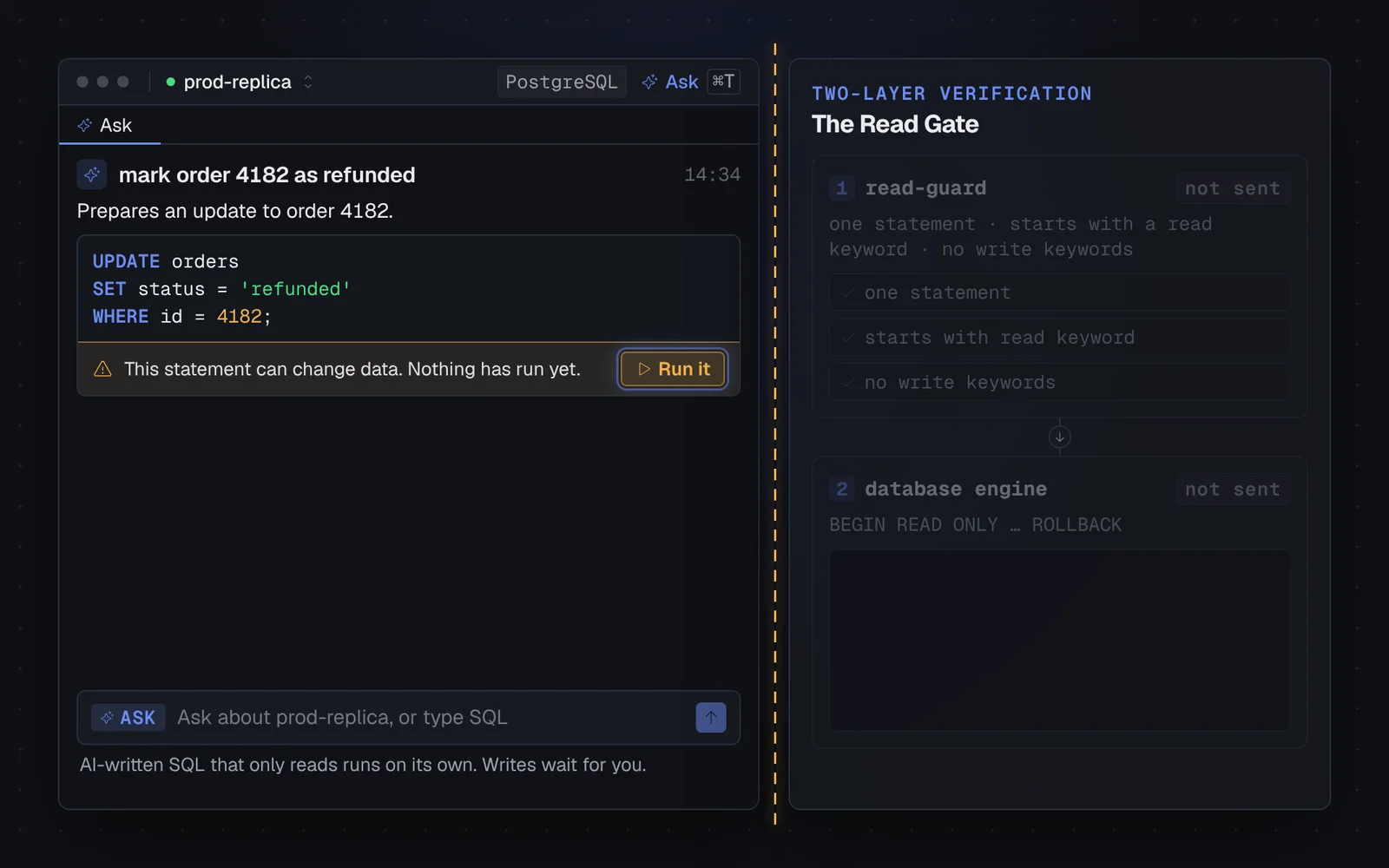
When the model returns an UPDATE, DELETE, INSERT, or DDL statement, the block stops with status needs-approval and a banner: "This statement can change data. Nothing has run yet." It only executes when you click Run it. Ignore it and nothing runs.
For edits in the SQL editor, Cmd+I (or Ctrl+I) opens an inline prompt. Describing a change returns a diff over the query; Enter accepts, Escape rejects, and Cmd+Z undoes. Building an AI SQL assistant covers where the editor integration started.
#Honest limits and trade-offs
Driving local CLIs introduces clear trade-offs:
- The CLI must be installed and signed in. data-peek cannot install Claude Code, Codex, or Antigravity for you. If missing, detection falls back to Connect an AI.
- Headless MCP limitations on Codex and Antigravity. Claude Code connects to data-peek's MCP server to verify queries against live tables before answering. Codex and Antigravity auto-cancel headless tool calls unless passed unsafe flags like
--dangerously-bypass-approvals-and-sandbox. Because I won't bypass approvals by default, Codex and Antigravity operate on schema context alone (agentic: false). - CLI startup latency. Each question spawns a child process and waits for the CLI to start before the model sees anything. For interactive questions this is fine; a direct API call starts faster.
- Sessions persist without row values. Each Ask tab preserves its last 40 blocks across restarts: prompts, SQL, column names, and row counts. Raw result rows are left out so query data never lands in local storage. Re-running a block re-fetches rows.
#What I'd do differently
If I were rebuilding the harness today, I would change three things:
First, stream token deltas consistently across all CLIs. Claude Code streams partial chunks as they generate. Codex and Antigravity deliver their answer per completed step rather than token by token, which feels noticeably less responsive.
Second, unify the AST parser. Currently, assertSingleReadStatement uses parseStatementsWithLines and then applies a separate regex. Merging safety checks directly into the AST parser would eliminate maintaining a second source of truth.
Third, re-check binaries on window focus. Detection runs once per launch. If someone installs Claude Code while the app is open, they have to restart data-peek to see it. Re-checking when the window regains focus would fix that.
#Trying it out
The Ask tab is the default view in data-peek, mapped to Cmd+T (or Ctrl+T) and the empty application state.
data-peek is available at datapeek.dev. Free for personal use, MIT source. If you already pay for an AI coding subscription, you can put it to work on your database without paying for another API key or exposing your tables to accidental writes.